

%202.jpg)

AI Chat Mode


As projects grow, finding specific evidence becomes harder. AI Chat Mode lets you ask natural language questions and get cited answers back instantly for deep research.
In this lesson of our AI Insights & Analysis Course, you’ll learn:
- What AI Chat Mode does
- How to ask effective questions of your data
- How to review and validate cited answers
What AI Chat Mode does
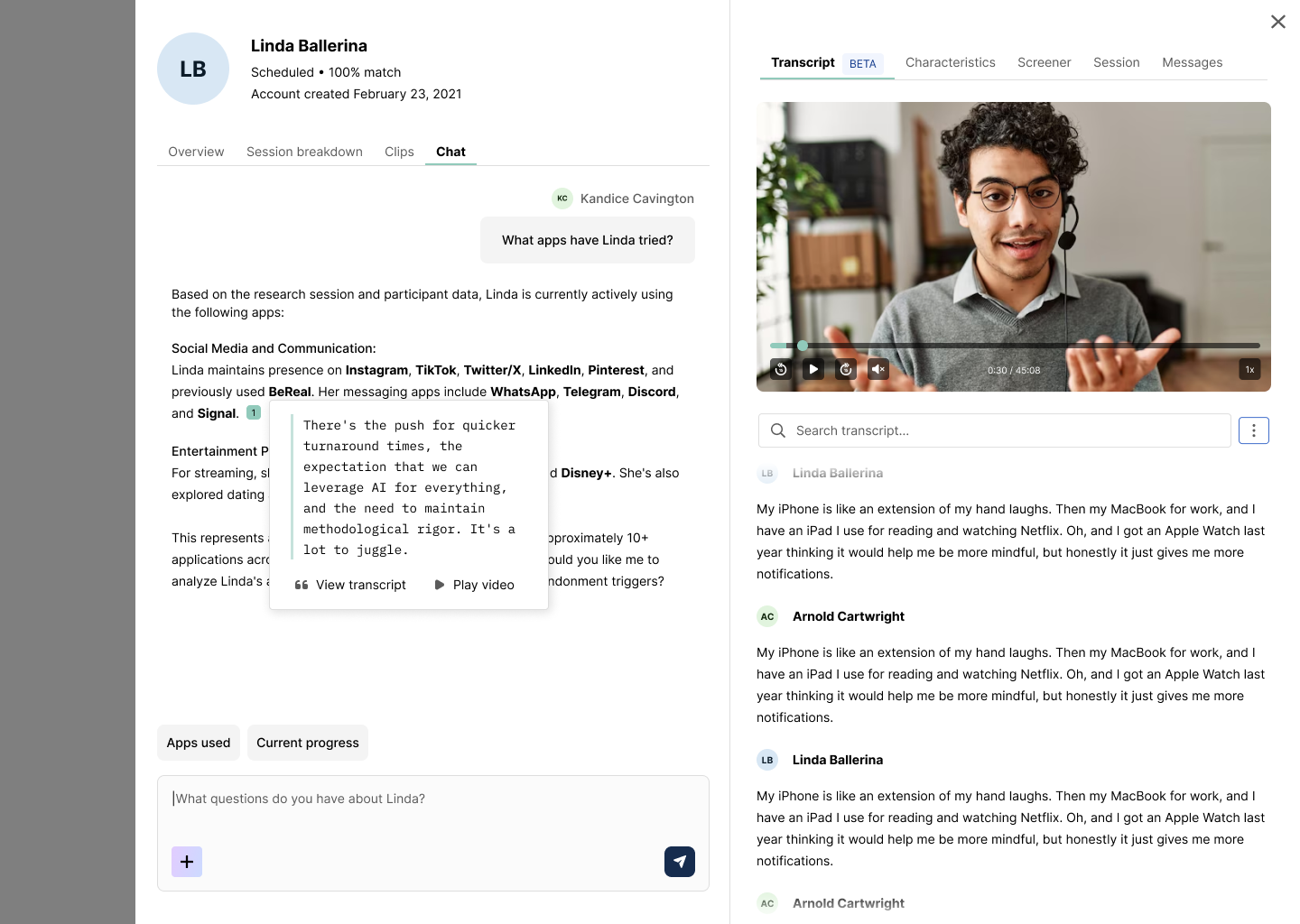
AI Chat Mode is a research-specific conversational interface built into User Interviews. It allows you to:
- Ask questions in plain language about a single participant session
- Ask cross-session questions across all participants in a project
- Receive synthesized responses grounded in transcript data
- View direct quotes with linked timestamps
- Jump directly to supporting evidence in transcripts
Use participant-level chat when you want to deeply explore one session.
Use project-level chat when you want to identify themes, patterns, contradictions, or supporting evidence across all participants.
Unlike generic AI tools, Chat Mode in User Interviews is grounded in your session data, structured around your discussion guide topics, and built to show its work.
How to ask effective questions using AI Chat Mode
Think of AI Chat Mode as a research assistant for retrieval and validation, not interpretation. You can use it to find supporting evidence, pressure-test emerging themes, surface contradictions, and quickly locate quotes for reports—but the quality of its output depends on the clarity of your questions.
AI Chat Mode analyzes all participant transcripts in the project (up to 20 participants in the current release). More focused questions will return more useful, synthesis-ready answers. To get better chat results, be sure to:
- Be specific about the topic or feature.
- Narrow scope if needed (e.g., “across all sessions” vs. “in session 3”).
- Follow up with clarifying prompts if answers are broad.
- Be thoughtful about how you construct your prompts (i.e. instead of asking “what did users think?” try “across all sessions, what did participants say about implementation complexity?”)
Here are some examples of effective prompts for AI Chat Mode:
- “Across all sessions, what themes emerged around pricing?”
- “Find quotes that mention confusion during onboarding.”
- “Is the theme ‘too complex to set up’ supported across sessions?”
- “Are there disagreements about feature X?”
- “How consistent were onboarding experiences across participants?”
- “What counterexamples exist for this theme?”
Reviewing and validating cited answers
Because AI Chat Mode is designed for transparency, every response includes direct quotes, clickable citations, and linked timestamps. For every response you intend to use in your final reports, click through to review the context, tone, and nuance to confirm the quote’s accuracy before sharing.
In other words, think of AI Chat Mode as a tool to help you answer “where is the evidence?” not “what should we decide?” AI Chat Mode helps you quickly surface and validate themes across participants, but your expertise remains essential for framing your findings, connecting research to business context, and identifying the implications and next steps.
AI Insights helps you move faster without losing rigor—by keeping analysis grounded in real participant data and human decision-making. Beyond reducing busywork, our AI Assistant will help you validate your insights with confidence, share your findings more effectively, and stay focused on what matters most: understanding your users.

